
In October 2026 someone posing as a crypto-startup founder offered me a senior Solidity role on LinkedIn, interviewed me over a recorded Google Meet call, and sent a Foundry coding test as the next step. The Solidity was clean and the interview was unremarkable. The malware was hidden in a VS Code configuration file, and it executed the instant I opened the integrated terminal to run the tests.
I run untrusted code in a throwaway virtual machine with no wallets and no credentials, and my funds sit in cold storage, so the attackers walked away with nothing. This is the full reconstruction, built from my own investigation, with the evidence redacted only where it would expose a stolen identity. At the end I have published the quarantined sample and a formal forensic report so other analysts can study it.
- first contact to payload
- 12 days
- 7 Oct → 19 Oct
- malware live before kill
- ~30 min
- 15:58 → 16:28
- second-stage infostealer
- 4.78 MB
- obfuscated JavaScript
- in the kill chain
- 7 stages
- 6 on trusted services
- stolen from me
- $0
- ran in isolated VM
- credentials on the host
- 0
- cold wallet, no keys
The timeline
Times are local. The operators invested nearly two weeks of rapport before the weaponised file ever arrived, which is exactly what makes this class of attack effective.
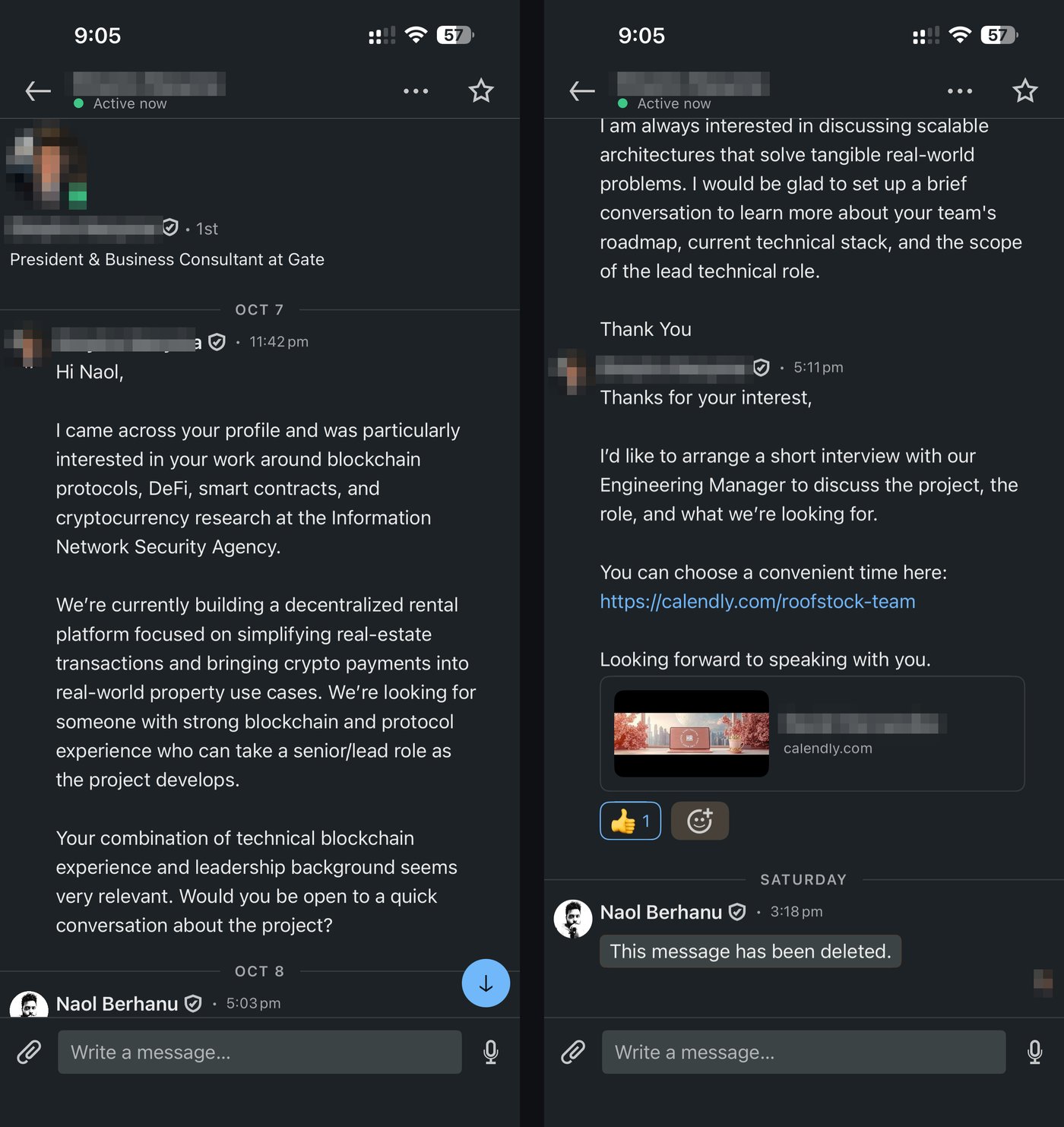
7 Oct, 23:42
First LinkedIn message
A verified-badge profile presenting as a startup president pitches a senior/lead blockchain role.
8 Oct, 17:03
I reply
Expressing interest in the role.
8 Oct, 17:11
Calendly link sent
A booking URL that borrows the name of a well-known, unrelated company, with a mismatched preview identity.
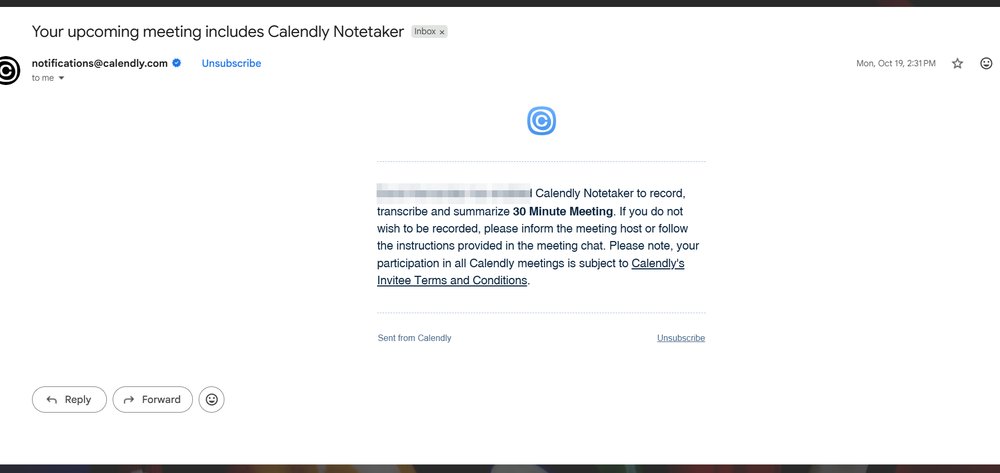
19 Oct, 14:31
Notetaker email
Calendly notifies me that the host enabled recording for the “30 Minute Meeting.”
19 Oct (day)
Interview and take-home
A smooth but scripted Google Meet call; the sol-live-main repository is sent afterwards.
19 Oct, 15:58
Payload fires
I open the VS Code terminal to run forge test; the hijacked terminal profile launches app.js.
19 Oct, 16:09
Second stage
A further Node.js process starts, contacting the attacker's host.
19 Oct, 16:28
Contained
I identify the hidden settings, terminate all malicious processes, and purge the staging folder.
Stage 1: the approach
The first message was well written, referenced my genuine background, and asked for nothing but “a quick conversation.” No link, no attachment, no urgency. The hook was reputation and curiosity. The profile carried a verified badge and a corporate headshot, and had been a first-degree connection for a while, so the message landed in my primary inbox rather than as a cold request.
Stage 2: the interview pretext
Within minutes of my reply came a Calendly link to interview with an “Engineering Manager.” Two tells sit in that one message. The booking URL borrowed the name of an established, unrelated real-estate-technology company that had never come up in conversation, and the link preview showed a third name with a generic, AI-generated office image.
On the morning of the call, a legitimate Calendly notification told me the Google Meet interview would be recorded by Notetaker. That is the quiet genius of this operation: every component is a real, reputable service. LinkedIn, Calendly, meeting recording, a Git host, npm. Nothing looks like attacker tooling until the very last step.
The call itself was smooth but stayed rigidly on script, with little genuine back-and-forth. I note that only as a weak corroborating signal, not as evidence: plenty of real interviews cross a language barrier, and nothing about an accent or limited small talk proves intent. It is only notable in hindsight, combined with the recorded call and the malicious take-home that followed immediately, which together match the documented playbook where the “interview” exists mainly to get the candidate to run code.
Stage 3: the take-home that looked real
The test was a 7.5 KB archive exported from a Git host. It presented as a credible senior Foundry assessment, and that credibility is the delivery mechanism.
I inspected every Solidity file and foundry.toml for Foundry's ffi cheat code, file-system access, environment reads and network calls. There was nothing malicious in the contract code at all. The task was exactly what a competent team might set, and the README pointed me at a terminal, which for most developers is the one inside VS Code.
Stage 4: where the payload hides
VS Code lets a workspace define terminal profiles. This file redefined the default terminal so that opening it executed attacker code first. The trick is that you never see it: lines 1 to 3 of the file each exceed a thousand characters, with an innocuous setting at the left, several hundred spaces, then the payload pushed far past the visible edge of the editor. With word wrap turned off lower in the same file, nothing wraps into view.
De-fanged, the Windows branch spawns a hidden PowerShell window, creates a cache folder, installs the axios HTTP library, writes a one-line app.js, and runs it. That one line fetches a JSON document and passes its “cookie” field straight to eval(), which is full remote code execution disguised as ordinary web traffic. The file carried matching profiles for macOS and Linux too, so the trap worked on any operating system.
Stage 5: execution, and the full kill chain
I opened the terminal at 15:58 to run the tests, and the hijacked profile fired immediately. Process inspection afterwards showed three Node.js processes running app.js from the cache folder, the first within seconds and a second stage about twelve minutes later. The payload was live for roughly thirty minutes before I terminated everything and purged the staging directory.
Seen end to end, the striking thing is how little of the chain looks hostile. Six of the seven stages run entirely on trusted, mainstream services; only the final eval() is unambiguously malware.
The second-stage JavaScript, about 4.78 MB and heavily obfuscated, is consistent with the BeaverTail infostealer family. Its target list is built for exactly this victim: browser wallet extensions such as MetaMask, Phantom, Rabby and Exodus, saved browser passwords and session cookies, SSH keys, cloud credentials, .env files, and Telegram, Discord and Slack tokens. The family is also a known loader for a Python backdoor. I did not retrieve or run the second stage; that inventory comes from the loader's behaviour and public analysis, not from bytes I recovered.
Why they got nothing
The malware executed, but it had nothing to steal. Three habits, in place long before this, made the difference.
- A disposable VM for untrusted code. I run interview take-homes and unknown repositories in a throwaway virtual machine that holds no accounts, wallets or keys. The payload executed against an empty box.
- Cold storage for crypto. My funds sit on a hardware wallet. There was no browser-extension wallet, keystore file or seed phrase on the machine for an infostealer to scrape.
- No credentials on the test environment. No saved browser passwords, no SSH keys, no cloud config, no .env. The categories BeaverTail targets were simply absent.
The right lesson is not “I got lucky.” It is that isolation and cold storage reduced a full compromise to a non-event. If you take one thing from this piece, let it be that: never run a stranger's code on a machine that holds anything you cannot afford to lose.
How to spot it
Most of these are only obvious in hindsight, which is the whole problem. In the order they appeared:
- The booking URL borrowed an unrelated well-known brand, and the interview invite showed a different name and a stock “HR” image.
- A senior, remote, crypto-adjacent role advanced from first message to take-home unusually fast. Speed plus flattery is a recurring feature.
- The test had to be run locally, rather than in a sandbox the “employer” controlled. A real assessment is just as happy with a hosted environment or a pull request.
- The repository shipped a .vscode/ folder at all. Workspace editor settings have no place in a candidate's test, and this one disabled AI assistants and hid itself from search.
- The interview stayed rigidly on script. Noted only in combination with the above; a language barrier alone is not evidence of anything.
If it already ran on a real machine
If you think the payload executed somewhere that held real assets, act in this order, and do the account work from a separate, clean device.
Disconnect the machine
Take it off the network to cut the attacker's live connection. Leave it powered on if you want to preserve evidence.
Move crypto first
From a clean device, create new wallets and move all funds out of any wallet that touched the machine. Revoke token approvals. Stolen crypto is almost never recovered, so this comes before everything else.
Revoke sessions and rotate secrets
Change passwords and sign out all sessions on email, GitHub, exchanges and your password manager. Stolen cookies bypass 2FA, so signing out matters as much as new passwords. Rotate SSH keys and cloud or API tokens.
Capture evidence, then rebuild
Save the loader file, process list and network connections, then wipe and reinstall the operating system. Deleting the malware is not enough, because the attacker could have run anything.
Report it
Report the recruiter on the platform, the repository to the Git host, and the sample to VirusTotal. Notify any impersonated company, and your own employer's security team if the machine held work access.
Why this matters beyond me
This tradecraft matches the publicly reported “Contagious Interview” campaign, which multiple vendors attribute to North Korea-linked (DPRK) threat actors (TraderTraitor / Lazarus). I frame that carefully: the techniques are consistent with that cluster, rather than a confirmed identification, because I am matching methods, not infrastructure validated against threat intelligence.
The reason it matters is scale. About ten days after my incident, Binance disclosed a breach that reporting traces to the same class of attack: a developer workstation compromised through social engineering, then lateral movement into internal systems. I wrote that incident up separately in Inside the $6.4 Billion Binance Breach. The takeaway needs none of the specific figures to hold: one engineer opening one repository on one trusted machine is a plausible initial-access path into a major organisation. That is precisely why isolation and cold storage are baseline controls, not paranoia — and why I treat every unsolicited “interview test” as hostile until proven otherwise.
Evidence and further research
For other analysts and researchers, I am publishing the primary evidence. The sample is a live infostealer delivery mechanism: handle it only inside an isolated VM, and never open the repository in an IDE on a machine you care about. The archive is password-protected (password: infected, the industry convention) so antivirus and accidental clicks cannot open it.